



If you no longer use Netflix, want to take a break from streaming, or simply want to cut down on your monthly expenses, canceling your subscription only takes a few minutes.
Netflix keeps the cancellation option inside your account settings, so you can stop your membership without having to contact customer support. Here’s how to cancel your Netflix subscription in four simple steps.
1
Click Your Profile Icon
1
Click Your Profile Icon
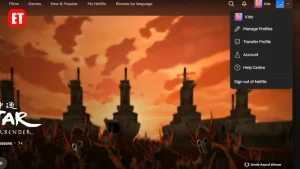
Start by signing in to your Netflix account. Once you’re on the Netflix homepage, look toward the top-right corner of the screen for your profile icon.
Click the profile icon to open the account menu.
2
Select Account
2
Select Account
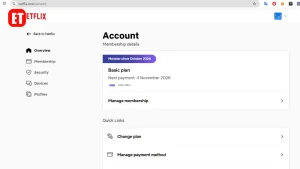
From the menu that appears, look for Account and click it.
This will take you to your Netflix account settings, where you can manage your membership, billing information, profiles, and other account preferences.
3
Open Your Membership Settings
3
Open Your Membership Settings
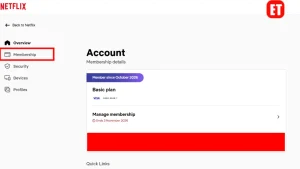
On the Account page, find the section related to your Netflix membership. Click Membership to view the options available for your current subscription.
This is where Netflix provides the controls for managing your plan.
4
Scroll Down and Click Cancel
4
Scroll Down and Click Cancel
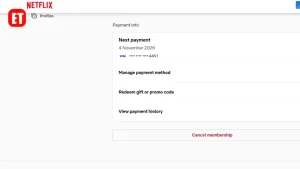
Scroll down until you find the Cancel option. Click Cancel and follow the instructions Netflix displays to confirm that you want to end your membership.
Once the cancellation is confirmed, Netflix will provide information about when your access will end. In many cases, you can continue watching Netflix until the end of your current billing period.
What Happens After You Cancel Netflix?
Canceling your subscription doesn’t necessarily mean you lose access immediately. If you’ve already paid for the current billing period, you may continue using Netflix until that period ends.
Your account may also remain available for a period of time, making it easier to restart your membership later if you change your mind.
Final Thoughts
Canceling Netflix doesn’t have to be complicated. From your Netflix homepage, open your profile menu, go to Account, select Membership, and then scroll down to find the Cancel option.
The entire process can usually be completed in just a few minutes, without needing to call or message Netflix support.

Erime Editor is the official editorial account of ErimeToday. Articles published under this name are created, reviewed, and managed by the ErimeToday editorial team to deliver helpful guides, technology tips, relationship advice, daily accurate word game answers, anime updates, gaming content, manga insights, news, and useful resources for readers around the world.





If this post helped you, support us 👇